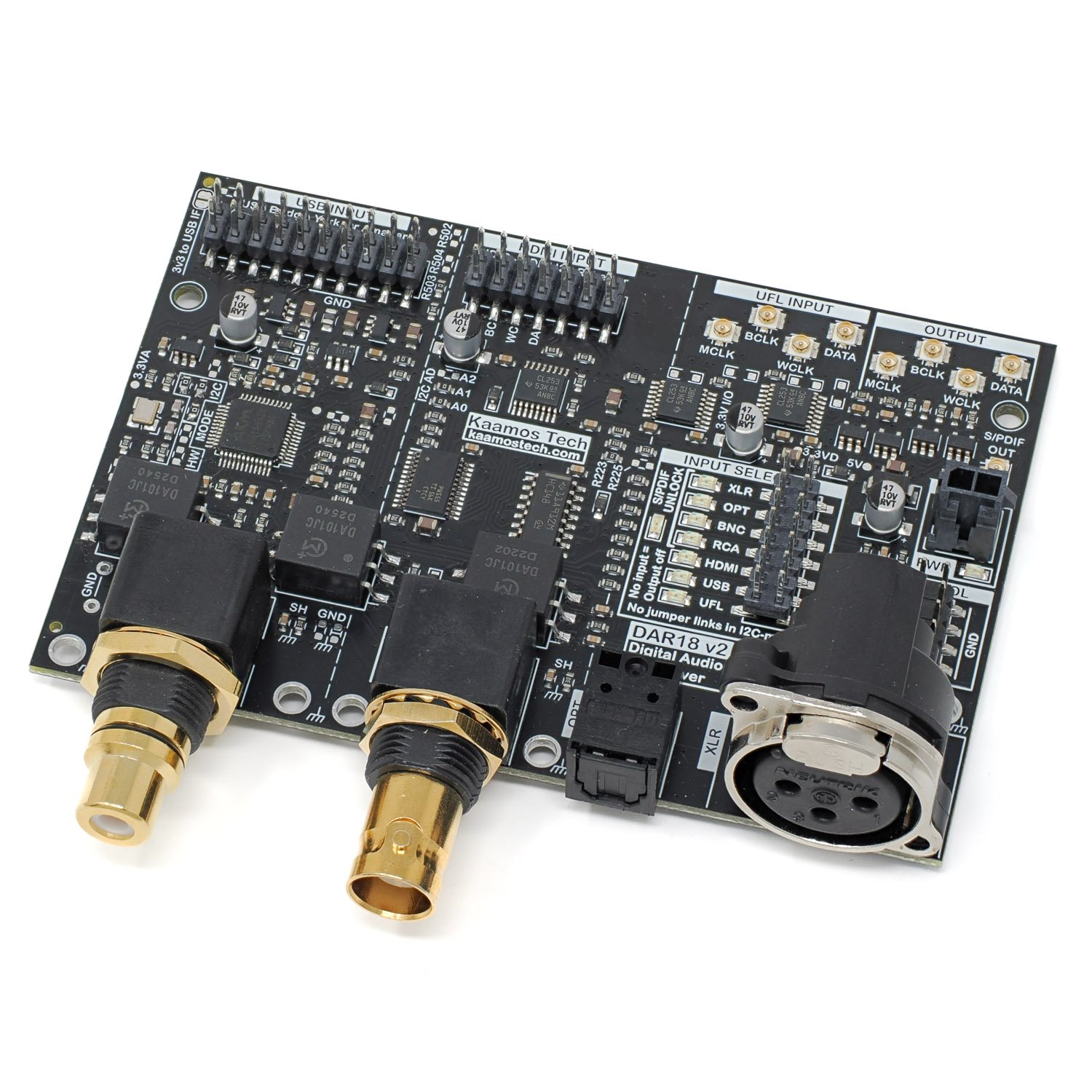
This additional information provides further guidance on using the Kaamos DAR 18 v2 board. Although the core function is straightforward, several contextual details could assist with system integration. If anything remains unclear, feel free to contact us.
Power supply
The board only requires 5V for digital VD supply. It should not exceed 5.5V. Typical current is around 25mA but it can go up to 50mA if multiple inputs with active signals are connected simultaneously. Moreover, using a HDIR add-on increases the supply by up to 30mA.
A Kaamos power supply (such as One Four All) offers a simple power connection via a 2-pin Molex Micro-Fit connector. Alternatively, you can purchase a power cable, cut off one connector and solder the wires to your own power supply.
Inputs
There are four S/PDIF inputs and three digital serial inputs.
S/PDIF inputs
All four S/PDIF inputs are galvanically isolated: Toslink naturally and the rest with S/PDIF transformers.
RCA and BNC are electrically equivalent, serving a standard single-ended S/PDIF signal via 75R coaxial cable at 0.5Vpp. XLR carries the same format on 110R balanced cable with a higher voltage up to 7Vpp. Toslink transmits this format through plastic optical fibre.
Toslink formally supports sample rates up to 96 kHz; 192 kHz functions as well, though performance declines. In general, Toslink is the least performing S/PDIF medium regarding jitter.
Digital serial inputs
All three inputs UFL, USB, and HDMI are electrically equivalent. They are simply routed to the board output via logic switches. Therefore, while the signals are named for PCM/I2S (MCLK, BCLK, WCLK, DATA), they can also be something else, such as DSD.
USB add-on
The placeholder supports York Pico, Amanero, and upcoming Kaamos USB Bridge, all of which have identical dimensions and compatible header pinout. However, please check the pinout and features since there are multiple boards available and we have not been able to test them all.
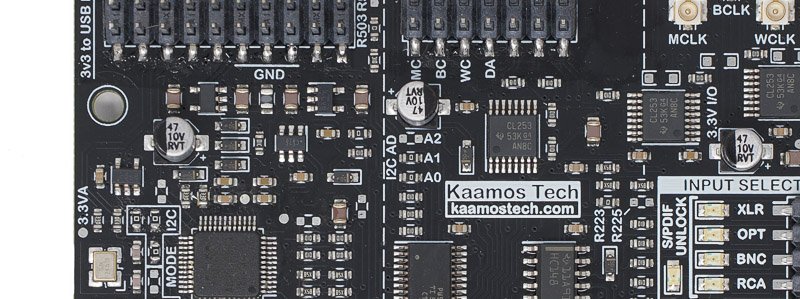
While the USB header contains a 3.3V pin, by default it is not connected to the 3.3V supply on the DAR 18. Typically, a non-isolated USB module is powered by the USB VBUS. However, isolated USB modules require a separate supply on the isolated non-USB side. If the header 3.3V is required, there is a solderable shorting bridge on the DAR18 that makes the connection (top right corner in the photo below).
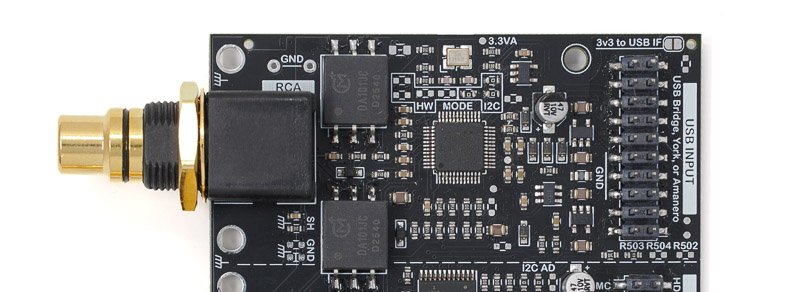
When the USB input is selected, USB_MUTE also sets the DAR 18 EMUTE output. If the EMUTE controls a mute relay, the user may find that the USB_MUTE causes frequent mute relay switching, and may want to disable this by removing the R503 seen above (bottom right corner). USB_MUTE behaviour depends on the module model, e.g. Amanero engages mute any time the music is paused, while York Pico only when it’s stopped using the same player.
HDMI I2S add-on
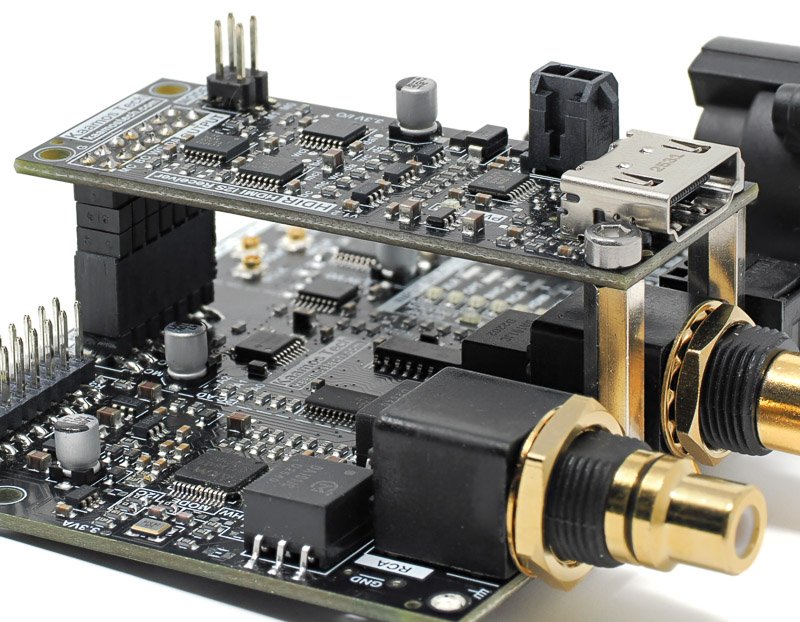
The placeholder supports Kaamos HDIR HDMI I2S Receiver. It takes power from the header 5V pin so there is no need to connect the HDIR Molex power cable.
Digital serial output
The output consists of the following four signals provided with U.FL connectors, signal level 3.3V:
- MCLK – Master Clock.
- BCLK – Bit Clock.
- WCLK – Word Clock (sometimes also referred to as LRCK).
- DATA.
S/PDIF inputs are always converted to PCM output (fixed to I2S in HW variant, while Left and Right justified are configurable in I2C variant).
If one of the digital serial inputs take DSD, for example, the user must ensure the pinout of the downstream device (e.g. DAC) match with the PCM pinout. For example, in W-DAC v3 the signal pins are shared by mode as follows:
- MCLK – the same in both PCM and DSD.
- PCM BCLK / DSD DCLK (Bit Clock).
- PCM WCLK / DSD DSDR (Right bit stream).
- PCM DATA / DSD DSDL (Left bit stream).
HW variant input selection
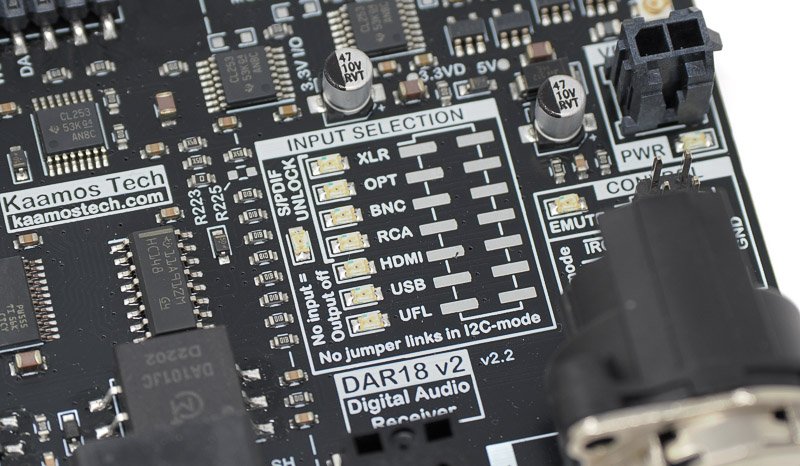
Input is selected with a single jumper link and therefore an external rotary switch is easily usable. When no input is selected, EMUTE output is high and OUTPUT is turned off. Therefore, using a make-before-break type switch reduces the number of state transitions and may improve pop and click performance in some use cases. Please refer to the pops & clicks section below for more information.
If more than one jumper link or contact is closed, the priority is: UFL, USB, HDMI, RCA, BNC, OPT, XLR.
I2C variant control
There are two ICs onboard that need to be programmed, otherwise the board will do nothing. Complete firmware is not provided but example register settings are provided below. The setup and configuration are simple if you are familiar with I2C devices – and AI can easily write the software for you.
SDA and SCL (and GND) need to be connected for I2C. They have 10k pull-ups on the DAR 18 board but you may want to have stronger pull-ups close to the host – albeit this works fine at least with slower I2C speeds.
I2C addresses
The address formats and default 7-bit addresses for the two ICs are:
- AK4118A: 0010 0 A1 A0 RW (0x10)
- TCA9555: 0100 A2 A1 A0 RW (0x24)
A2, A1 and A0 are configurable by 0R resistors: populated is 0, unpopulated is 1. By default, A2 is unpopulated (1), and A1 and A0 are populated (0). RW bit is 0 for write and 1 for read as always in I2C.
Note that different AKM ICs use the same address space so if you have a DAC, ADC, and DAR 18 in the same I2C bus, make sure all boards use unique addresses.
TCA9555 I/O expander
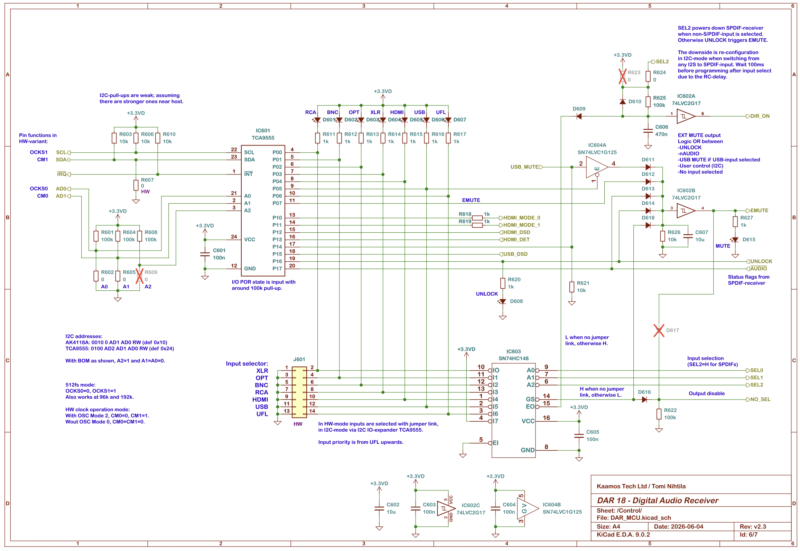
The TCA9555 is a 16-bit I2C I/O expander. Its pins may be set as inputs or outputs, each featuring an internal 100 kΩ pull-up resistor. The pin connections are:
- P0 = Input select RCA (output).
- P1 = Input select BNC (output).
- P2 = Input select OPT (output).
- P3 = Input select XLR (output).
- P4 = Input select HDMI (output).
- P5 = Input select USB (output).
- P6 = Input select UFL (output).
- P7 = EMUTE manual override (output).
- P10 = HDIR add-on HDMI MODE 0 (output).
- P11 = HDIR add-on HDMI MODE 1 (output).
- P12 = HDIR add-on HDMI DSD (input).
- P13 = HDIR add-on HDMI DET (input).
- P14 = USB add-on USB MUTE (input).
- P15 = USB add-on DSD (input).
- P16 = S/PDIF UNLOCK (input).
- P17 = S/PDIF nAUDIO (input).
Only P0 to P6 are needed for input selection. P7 may help control EMUTE output if linked to an external DAC or power amplifier. P10–P13 relate to the HDIR add-on, with P10 and P11 key for HDMI pinout configuration. P14 and P15 read USB MUTE and DSD status flags, while P16 and P17 read S/PDIF receiver flags, which default to UNLOCK and nAUDIO but may be altered in the AK4118A registers.
Register programming
For register settings, refer to the TCA9555 and AK4118A datasheets. The code snippet from the DAR 18 v2 test environment below illustrates the configuration needed. Features such as HDIR control or reading status flags are not used in the example.
var adExp = 0x24; // TCA9555 I2C-address
var adDir = 0x10; // AK4118A I2C-address

// Uncomment a line to select the input
var input = 0 // BNC
//var input = 1 // RCA
//var input = 2 // OPT
//var input = 3 // XLR
//var input = 4 // USB
//var input = 5 // HDMI
//var input = 6 // UFL


// TCA9555 CONFIGURATION

// Set default output states before changing the direction registers.
Write(adExp, 0x02, 0xFF); // No input selected, EMUTE on
Write(adExp, 0x03, 0x00); // HDMI Mode 0

// Configure the direction registers (in/out) as listed above
Write(adExp, 0x06, 0x00); // All outputs
Write(adExp, 0x07, 0xFC); // P10-11 outputs, the rest inputs

wait(0.1) // Probably not needed.

// In the writes above, no input is selected yet.
// It also means AK4118A is powered down and cannot be written to.

// Select input. Lights LED and turns AK4118A on if needed.
switch (input) {
    case 0:
        Write(adExp, 0x02, 0x7B); // BNC input selected, EMUTE off
        break;
    case 1:
        Write(adExp, 0x02, 0x77); // RCA input selected, EMUTE off
        break;
    case 2:
        Write(adExp, 0x02, 0x7D); // OPT input selected, EMUTE off
        break;
    case 3:
        Write(adExp, 0x02, 0x7E); // XLR input selected, EMUTE off
        break;
    case 4:
        Write(adExp, 0x02, 0x5F); // USB input selected, EMUTE off
        break;
    case 5:
        Write(adExp, 0x02, 0x6F); // HDMI input selected, EMUTE off
        break;
    case 6:
        Write(adExp, 0x02, 0x3F); // UFL input selected, EMUTE off
        break;
}

// AK4118A is used and powered up only when S/PDIF input selected.
if (input > 3) return;

// AK4118A CONFIGURATION

wait(0.2) // 100ms RC after AK4118A is powered up.

Write(adDir, 0x00, 0x6B); // 512fs mode
Write(adDir, 0x01, 0x52); // 24b I2S, DEM disabled
Write(adDir, 0x02, 0x00); // Disable TX

// S/PDIF input selection in AK4118A.
switch (input) {
    case 0:
        Write(adDir, 0x03, 0x41); // 0x40=RCA, 0x41=BNC, 0x42=OPT, 0x43=XLR
        break;
    case 1:
        Write(adDir, 0x03, 0x40); // 0x40=RCA, 0x41=BNC, 0x42=OPT, 0x43=XLR
        break;
    case 2:
        Write(adDir, 0x03, 0x42); // 0x40=RCA, 0x41=BNC, 0x42=OPT, 0x43=XLR
        break;
    case 3:
        Write(adDir, 0x03, 0x43); // 0x40=RCA, 0x41=BNC, 0x42=OPT, 0x43=XLR
        break;
}

Write(adDir, 0x20, 0x3F); // Disable RX Input detect and power down oscillator - huge performance impact
Please note that selecting a digital serial input powers down the AK4118A to prevent incorrect status flags and mute operation. Since the power-down resets the registers, moving from a digital serial input to an S/PDIF input requires reconfiguring the AK4118A.
Performance tweaks
Noting the AK4118A writes above, operating the S/PDIF receiver in 512fs mode means the multiplier adjusts per sample rate while keeping MCLK at 24.576MHz. Typically, the higher the MCLK/WCLK ratio, the better the performance. By contrast, 64fs mode would produce only 6.144 MHz MCLK at 48 kHz, which can reduce DAC performance—particularly in AKM devices.
The last write command above follows extensive evaluation and requires some clarification. First, the 24.576MHz onboard oscillator is disabled in the HW-variant but remains available in the I2C version. This oscillator does not affect audio quality or clock recovery, which rely entirely on the PLL locked into the incoming S/PDIF stream. The oscillator is only used for calculating the input sample rate readable in a register. Unfortunately, it introduces spikes in the FFT measured after the DAC, and the ‘RX Input Detect’ feature adds further interference. Consequently, both the oscillator and the input detection features are disabled in the final line of the code.
To read the input sample rate, you should enable the oscillator briefly and then switch it off again. Further details are available in the AK4118A datasheet register map.
To illustrate the contrast, the results below use a preliminary DAR 18 prototype and a W-DAC prototype; the findings extend to the newer boards. The additional spurious components sit just below the dominant harmonics, and at –130 dB they would be inaudible; nonetheless, this single write cleans the FFT remarkably well. It would be helpful if the datasheet noted this, since determining it required considerable trial and error.
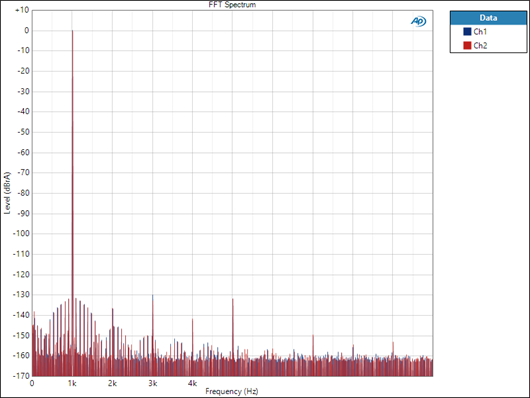
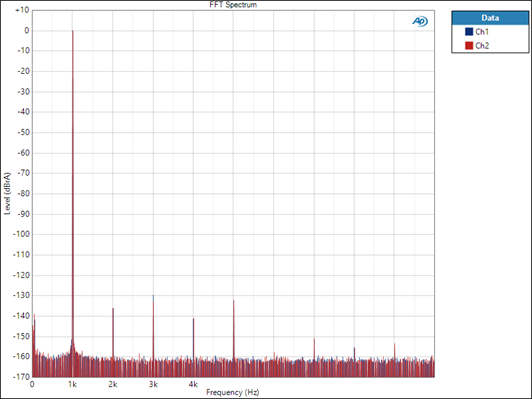
This tweak only applies to the I2C variant. The HW variant yields a clean FFT because it lacks both the oscillator and the RX Input Detect feature.
S/PDIF output
An S/PDIF output via U.FL connector is provided, delivering a re-clocked input signal. Although infrequently required, this feature is included because the IC supports it. It is effectively limited to the I2C variant; in the HW variant, the input is fixed to RCA and cannot be reconfigured.
Please note that converting PCM or DSD input to an S/PDIF output is not possible. Please see SPDIF TX for that purpose.
Pops & clicks and EMUTE
Considerable work has gone into testing and reducing pops and clicks during input changes, sample rate shifts, S/PDIF or USB cable connections and power toggles during playback. Because how noticeable a glitch is depends on downstream devices like DACs, amplifiers, and speakers, we can offer only general guidance for system integration.
To manage possible pops, the EMUTE output may be connected to the DAC or power amplifier to mask them.
Please note that any audio switching can produce pops and clicks, and system integrators often need to manage these issues. We have no reason to think the DAR 18 v2 performs worse than other similar modules, but we share this information for full transparency, as no device is flawless in this regard. In most situations this is irrelevant, though it matters in some.
This information is mainly relevant to the HW variant due to its automatic EMUTE operation. For full control, please consider the I2C variant where EMUTE can be controlled directly.
So when should one be concerned about pops and clicks?
Short answer
The Kaamos W-DAC v3 avoids pops and clicks even without an EMUTE signal, owing to its own refined mute function. By contrast, the earlier W-DAC XLR or v2 show a slightly higher tendency toward glitches.
With an analogue volume control in the setup, pops and clicks tend to be negligible or inaudible because they vary with the level of volume, and the pops from DAR 18 v2 tend to be small.
In a high-gain setup, such as a DAR 18 linked to a DAC that feeds directly into high-gain power amplifiers or active speakers lacking analog gain control, glitches may be heard.
Long answer
Generally, we can divide the origins of pops into several categories:
- DAC IC turning on/off. With AKM DACs this occurs when the DAC receives/loses clocks.
- DAC IC output glitch due to clock change.
- Momentarily erroneous data.
These are all ‘digital’ flaws; additionally, supply rail issues such as power-up and power-down may produce pops in the DAC output stage. Furthermore, the DAC feeds power amplifiers or active speakers that introduce their own sources of pops. Because the DAR 18 is a digital device, we shall concentrate on these. From our experience, item 1 is the main cause for potential pops with AKM DACs.
The DAR 18 v2 OUTPUT and EMUTE function as follows:
- No input selected:
- OUTPUT off (no clocks or data).
- EMUTE high.
- S/PDIF input is selected but unlocked/unconnected:
- OUTPUT:
- HW-variant: OUTPUT has low-frequency clocks. This usually keeps DAC on without any issues or glitches but it depends on the DAC. With AKM DACs this is beneficial since it prevents the DAC from turning off.
- I2C-variant: OUTPUT is off with the I2C-writes given below; may be possible to change with register settings.
- EMUTE is high.
- OUTPUT:
- USB input selected:
- Input is directly routed to OUTPUT.
- EMUTE is high if USB_MUTE is high. This connection can be changed by removing R503.
- HDMI or UFL input selected:
- Input is directly routed to OUTPUT.
- EMUTE is low.
- Any time EMUTE goes low, there is a small delay in it.
Certain aspects of the above behaviour may be adjusted through modifications.
USB, HDMI and UFL sources are directly routed to the output and any pop upstream passes through.
Pop and click performance was assessed using the Kaamos W-DAC v3 and the earlier Kaamos W-DAC XLR within a setup with 30–40 dB more gain than our typical listening levels, effectively representing a high-gain setup with digital volume control—the most demanding case. As noted above, the W-DAC v3 produces no audible pops.
Older W-DAC XLR is slightly more prone to pops in certain situations:
- No EMUTE:
- Click when input is unselected (jumper link removed).
- This can be eliminated by using a make-before-break switch. Clicks are still possible between different types of inputs, such as S/PDIF and digital serial, depending on the input signals.
- Click when input is unselected (jumper link removed).
- EMUTE from DAR 18 to DAC:
- No clicks – except for the Mute relay clicking.
- The relay may be switching frequently with the USB input if connected to a computer, for example, and the relay changes state every time audio starts and stops. USB_MUTE can be disconnected from the EMUTE by removing the resistor R503. Naturally, this also removes other USB_MUTE functions, such as when the USB cable is disconnected; it is mostly not a problem but worth noting.
- No clicks – except for the Mute relay clicking.
HW vs. I2C variant hardware differences
Both variants use the same PCB with minor BOM differences. Therefore, it is possible to convert a board between the two variants.
MODE resistors (all 0R) shown below determine whether the board is HW or I2C variant: when the board is HW variant, the resistors inside the HW box are populated and resistors in the I2C box are not.
Besides the MODE resistors, the only difference is that the I2C variant does not have the input selector header populated.